
Introduction
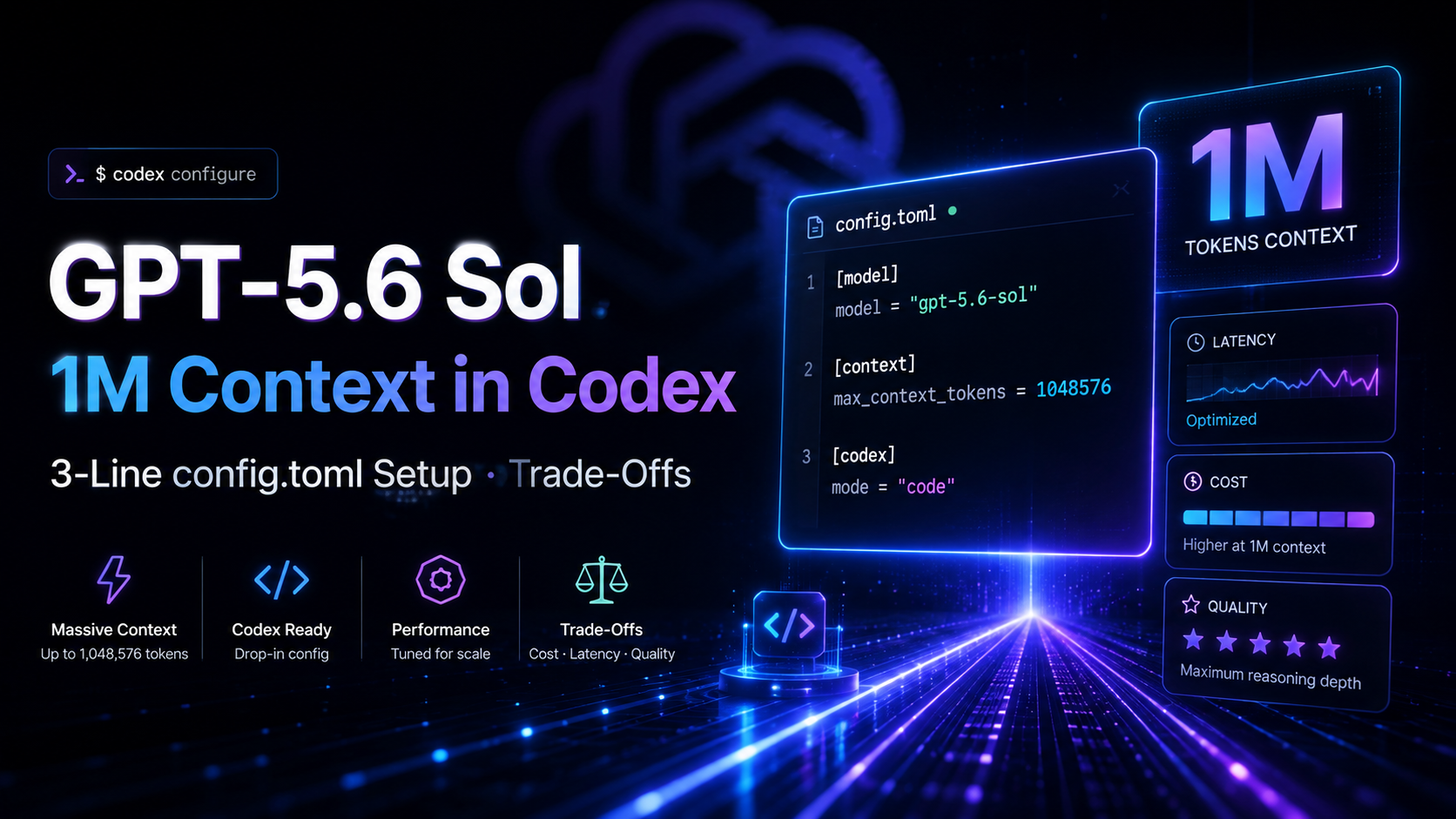
GPT-5.6 Sol can now use a 1-million-token context budget inside Codex when you authenticate through a ChatGPT account.
The setup is only three lines:
model = "gpt-5.6-sol"
model_context_window = 1000000
model_auto_compact_token_limit = 900000
Add those settings at the top level of Codex’s config.toml, restart the client, and begin a new session.
The important part is not just the larger number. The third setting leaves roughly 100,000 tokens of headroom and tells Codex to begin compacting older history at around 900,000 tokens rather than waiting until the context is completely full.
OpenAI has also been very clear about the trade-off: Codex’s default context limit is deliberately tuned for performance and cost. A 1M window gives you more room for code, tool output, and conversation history, but it can also consume substantially more usage and does not guarantee equally strong retrieval at the far end of the window.
Three Lines to Enable GPT-5.6 Sol’s 1M Context
OpenAI’s published Codex configuration uses exactly these three top-level settings:
model = "gpt-5.6-sol"
model_context_window = 1000000
model_auto_compact_token_limit = 900000
Each line has a specific role.
- Select GPT-5.6 Sol
model = "gpt-5.6-sol"
This tells Codex which model to use for the session.
GPT-5.6 Sol is the flagship model in the GPT-5.6 family and supports a context window large enough for the 1M configuration.
- Set the Working Context Budget to One Million Tokens
model_context_window = 1000000
OpenAI’s Codex configuration reference defines model_context_window as the number of context-window tokens available to the active model.
The override tells Codex to allocate a one-million-token budget rather than use the smaller product default.
This larger budget can keep more of the following material in active context before compaction:
- Source code.
- Repository files.
- Tool output.
- Terminal logs.
- Earlier conversation turns.
- Planning notes.
- Agent history.
That can be useful on long-running repository work where an agent repeatedly needs details from earlier stages.
- Start Automatic Compaction at About 900K Tokens
model_auto_compact_token_limit = 900000
OpenAI defines this setting as the token threshold that triggers automatic history compaction.
At around 900,000 tokens, Codex begins compressing older material rather than continuing to grow the active history until the full context limit is exhausted.
The approximate behavior is:
0 → 900K tokens
Keep growing active history

Around 900K
Start automatic compaction

Up to 1M budget
Keep headroom for continued reasoning and tool use
The extra room matters because the model still needs space for new messages, tool results, reasoning, and generated output.
Put the Settings Before Any [section] Header
The three settings must be top-level TOML keys.
OpenAI’s instructions say to place them before any section header in config.toml.
A valid layout looks like this:
model = "gpt-5.6-sol"
model_context_window = 1000000
model_auto_compact_token_limit = 900000

[features]
# other settings here
Do not accidentally nest them under another section:
[features]
model = "gpt-5.6-sol"
model_context_window = 1000000
model_auto_compact_token_limit = 900000
That changes their TOML scope and is not the documented setup.
Where Codex Stores config.toml
OpenAI documents the user-level configuration file at:
~/.codex/config.toml
You can also use a project-scoped file:
.codex/config.toml
inside a repository or subdirectory when you want settings to apply only to that project.
After editing the configuration:
- Save
config.toml. - Restart the Codex client.
- Start a new session.
The new context settings should then apply to that session.
Use 1M Context for Only One CLI Session
You do not have to change your defaults permanently.
OpenAI also documents a per-session CLI form:
codex -m gpt-5.6-sol \
-c model_context_window=1000000 \
-c model_auto_compact_token_limit=900000
This is useful when you normally prefer Codex’s default context behavior but occasionally need more room for a particularly large repository or long-running task.
Once that CLI session ends, your normal configuration remains unchanged.
A practical workflow is:
Normal task
→ use Codex defaults

Exceptionally large task
→ launch one 1M-context CLI session
That is generally easier to manage than leaving every Codex task on the maximum window.
Why Was 1M Context Not the Default?
GPT-5.6 Sol already supports a very large context window.
The limitation was not simply a missing model capability.
Codex uses a smaller default because the product is tuned around a balance between:
- Performance.
- Latency.
- Usage.
- Long-session reliability.
- Compaction behavior.
OpenAI’s official community post says the default context limit has been carefully tuned for performance and cost.
A larger window lets Codex retain more raw material, but every additional piece of history can increase the amount of context the system has to manage on later turns.
For an agent that runs for hours, “keep everything verbatim forever” is not automatically the best strategy.
Automatic Compaction Is Part of the Default Design
Codex can summarize older history as a session grows.
That makes a long-running agent behave more like:
Recent details
+
compressed older history
+
important persistent state
instead of:
every token from the entire session
re-sent forever
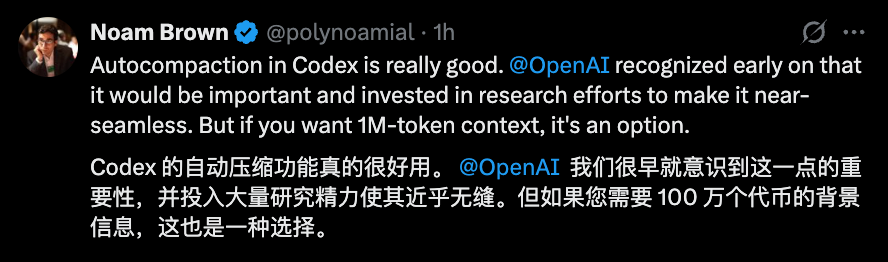
OpenAI researcher Noam Brown highlighted this approach publicly, noting that the company invested heavily in making automatic compaction feel close to seamless while still leaving the 1M option available for users who genuinely need it.
Compaction is especially useful when old tool traces contain huge amounts of information that are no longer needed verbatim.
Examples include:
- Old test logs.
- Build output.
- Earlier search results.
- Superseded implementation plans.
- Repetitive terminal output.
A good summary can preserve the important state without forcing the model to repeatedly process every old token.
Use the 1M Window Carefully
The source article’s second major section is essentially a warning: just because Codex can use 1M context does not mean every session should.
One community post strongly advised users not to enable the override by default, arguing that Codex performs best with the tuned default and that very long-context use can consume account limits much faster.
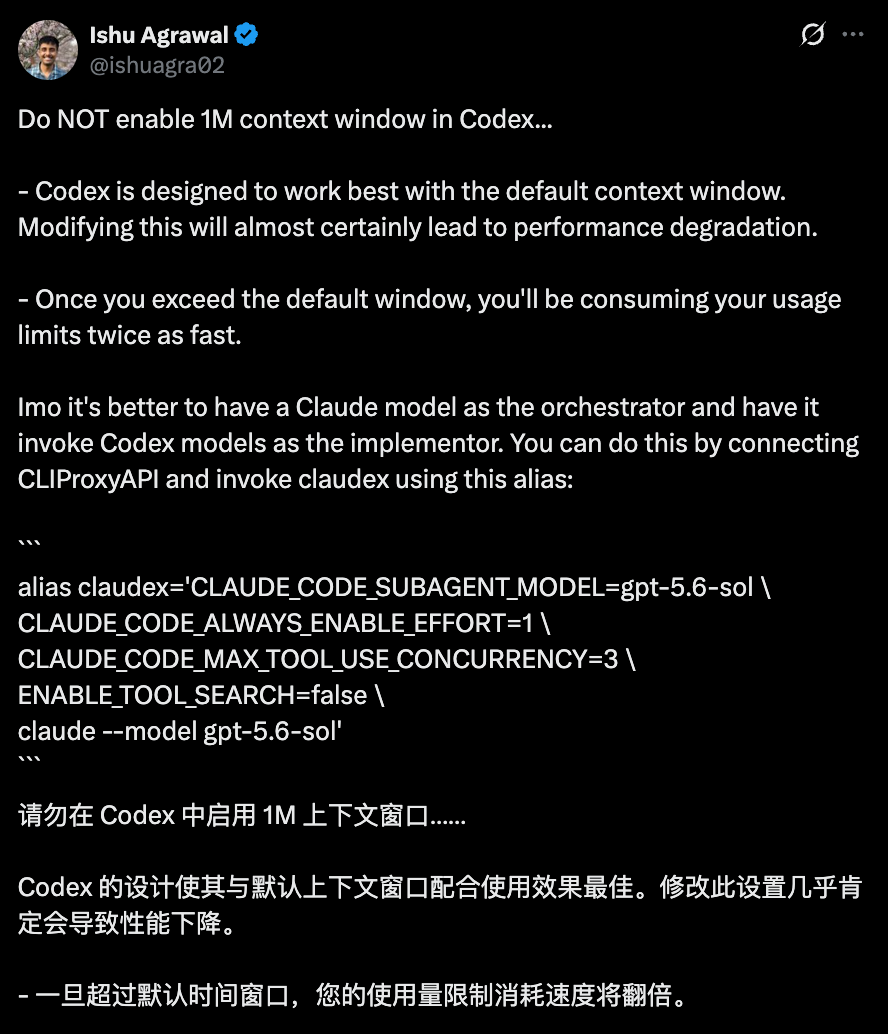
The exact usage multiplier can depend on current product policy and plan behavior, so check OpenAI’s live Codex pricing and rate-limit documentation rather than assuming one fixed number.
The broader warning is sound:
More active context generally means more tokens have to be carried through later turns.
For a long-running coding agent, that can become expensive quickly.
A 1M Window Does Not Mean 1M Tokens Are Equally Useful
A model can technically accept a long prompt while still becoming less accurate at retrieving information buried deep inside it.
OpenAI’s own GPT-5.6 long-context results illustrate this.
| Evaluation | GPT-5.6 Sol |
|---|---|
| OpenAI MRCR v2 8-needle, 256K–512K | 91.5% |
| OpenAI MRCR v2 8-needle, 512K–1M | 73.8% |
| GraphWalks BFS, 256K F1 | 90.7% |
| GraphWalks BFS, 1M F1 | 77.1% |
The model remains capable at very long context, but performance is not flat across the entire range.
This is why “larger context window” and “better context utilization” should be treated as separate concepts.
A 1M window answers:
How much can the system fit?
It does not automatically answer:
How reliably can the model use every detail at every position?
When 1M Context Makes Sense
The override is most useful when you have a real reason to keep unusually large amounts of raw information active.
Examples include:
Build a showcase site and grow leads in minutes
Describe your idea once, and We0 AI can generate a showcase site, pages, and CMS, then help you attract customers and traffic after launch.
One complete project generation for free registration
Best for trying one complete generation flow and seeing a first project draft quickly.
Large Repository Refactors
A task may touch many packages, interfaces, tests, and configuration files at once.
Keeping more code in context can reduce repeated rediscovery.
Long Debugging Sessions
A difficult production issue may involve:
- Historical logs.
- Multiple failed hypotheses.
- Several code changes.
- Test results.
- Environment details.
A larger window can preserve more of that evidence before compaction.
Large Migrations
Framework or API migrations often require the agent to track changes across many files and remember earlier decisions.
Multi-Stage Research and Implementation
Some tasks involve:
research
→ architecture plan
→ implementation
→ tests
→ review
→ revisions
A larger context budget can reduce the chance that early source material is summarized too aggressively before later stages.
Tasks With Large Tool Outputs
If the agent must inspect large generated reports, dependency graphs, or structured tool outputs, the extra headroom may be useful.
When the Default Is Better
For most everyday coding tasks, the default is likely the better choice.
Examples include:
- Fixing one bug.
- Editing a handful of files.
- Adding a small feature.
- Writing tests.
- Reviewing a pull request.
- Updating documentation.
- Running short research tasks.
In these cases, a 1M context window can create additional usage without providing enough practical benefit to justify it.
The OpenAI recommendation is not “never use 1M.”
It is closer to:
Use the tuned default unless
the task genuinely needs more raw context.
A Practical Decision Rule
Before enabling 1M context, ask:
Is Codex losing information because compaction happens too early?
If the answer is no, leave the default alone.
If the answer is yes, ask a second question:
Would preserving more raw history materially improve this task?
Only then is the 1M override likely to be worth trying.
This helps distinguish a real context problem from a general desire to maximize every setting.
Watch Your Session Instead of Waiting for 900K
The 900K auto-compaction threshold is a safety margin, not a target you need to hit.
A healthy workflow can still split an extremely long task into logical sessions.
For example:
Session 1
Research and architecture

Session 2
Implementation

Session 3
Testing and cleanup
At the end of each stage, save durable project state in:
- Repository files.
- Issue notes.
- Plans.
- Tests.
- Documentation.
- Version control.
Then the next session does not need to depend entirely on chat history.
This also makes work more reproducible for humans.
Do Not Treat the Context Window as Storage
Context is temporary working memory.
It is not a replacement for:
- Git.
- Documentation.
- Issue trackers.
- Test suites.
- Project plans.
- Persistent memories.
- Structured data.
If an important decision matters tomorrow, put it somewhere durable.
The best long-running agent workflows combine a strong context window with persistent project artifacts rather than relying on one enormous transcript.
The Source Article’s “Twice as Fast” Warning
The original article highlights a community warning that once the session moves beyond the default context budget, Codex usage limits may be consumed at roughly twice the rate.
That warning was publicly amplified in the community discussion.
However, product usage rules can change, and OpenAI’s current GPT-5.6 1M configuration post does not define one universal 2× rule in the three-line setup itself.
Therefore, the safest guidance is:
- Expect large-context sessions to consume more usage.
- Monitor the Codex usage indicator on your plan.
- Check current OpenAI pricing/rate-limit documentation.
- Do not assume the multiplier will remain identical across models, plans, or future releases.
The important operational fact is the direction of the cost curve, not one permanent multiplier.
The 1M Setting Is Now Available Through ChatGPT Accounts
The change that triggered the source article was not the existence of a large GPT-5.6 Sol context window.
It was access through Codex sessions authenticated with ChatGPT accounts.
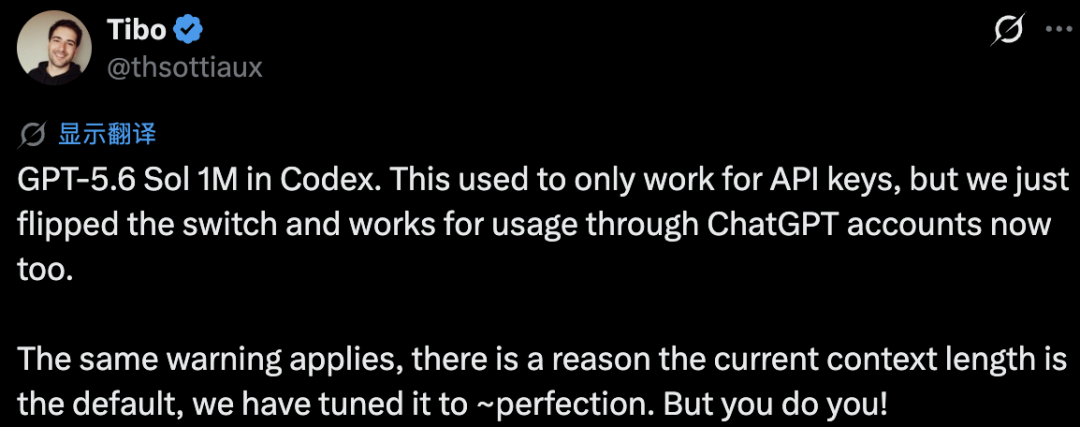
Tibo Sottiaux’s announcement said the configuration had previously worked only for API-key usage and that OpenAI had enabled it for ChatGPT-account usage as well.
That makes the feature available to a much broader group of Codex users without requiring a separate API-key workflow.
Your actual access still depends on the Codex model availability and limits associated with your current ChatGPT plan.
One More Thing: Astra Is Expected in Codex
The source article ends with a short update from Tibo Sottiaux.
In a public post describing Codex, he included the note that Codex “will have Astra.”
OpenAI has separately confirmed that Astra is an upcoming model and has called an internal version its next major model.
That is enough to support this statement:
Astra is an upcoming OpenAI model,
and the Codex lead says Codex will get it.
It is not enough to state as fact that:
Astra = GPT-6
OpenAI has not officially announced that product name.
Likewise, there is no public Codex release date for Astra in the sources verified for this article.
The useful takeaway is simply that OpenAI intends Codex to remain a deployment surface for its next frontier model generation.
Quick Setup Checklist
- Make sure your Codex version is current.
- Confirm that GPT-5.6 Sol is available on your account.
- Open
~/.codex/config.toml. - Add the three settings before any
[section]header. - Save the file.
- Restart Codex.
- Start a new session.
- Use the larger window only for tasks that genuinely benefit from it.
- Monitor usage and context quality during very long sessions.
- Remove the override if the extra context is not improving your workflow.
The configuration is:
model = "gpt-5.6-sol"
model_context_window = 1000000
model_auto_compact_token_limit = 900000
For one CLI session only:
codex -m gpt-5.6-sol \
-c model_context_window=1000000 \
-c model_auto_compact_token_limit=900000
常见问题
Does GPT-5.6 Sol really support a 1M context window?
Yes. OpenAI’s official Codex community documentation says GPT-5.6 Sol has a documented 1,050,000-token context window. The Codex override shown here sets the working budget to 1,000,000 tokens.
Where do I put the three Codex settings?
Put them at the top level of ~/.codex/config.toml, before any [section] headers. You can also use a project-scoped .codex/config.toml when you want the settings to apply only inside one repository.
Why is model_auto_compact_token_limit set to 900000?
It tells Codex to begin automatic history compaction around 900K tokens. That leaves roughly 100K tokens of headroom inside the configured 1M budget for continued tool use, conversation, reasoning, and output.
Do I have to enable 1M context permanently?
No. You can pass the same settings with -c flags for one CLI session. This is useful when only a few unusually large tasks need the expanded context.
Will 1M context make GPT-5.6 Sol more accurate?
Not automatically. OpenAI reports 91.5% on MRCR v2 at 256K–512K context and 73.8% at 512K–1M, showing that retrieval quality decreases in the longest range even though the model can accept the context.
Does enabling 1M context use more Codex quota?
It can. OpenAI says the default is tuned for performance and cost, and the source article highlights community reports that very long sessions can consume limits much faster. Check current Codex usage and rate-limit documentation because the exact accounting can change.
Is automatic compaction better than keeping the entire history?
Often, yes. Compaction can preserve the important state of older turns without repeatedly carrying every raw log and tool result. For tasks that genuinely require exact old details, the 1M override gives you the option to delay that compaction.
Is Astra officially GPT-6?
No. OpenAI has publicly described Astra as an upcoming model and its next major model, while Tibo Sottiaux has said Codex will have Astra. OpenAI has not officially announced that Astra’s product name is GPT-6.
相关工具
- Codex: OpenAI’s agentic coding environment for terminal, IDE, desktop, and cloud workflows.
- GPT-5.6 Sol: OpenAI’s flagship GPT-5.6 model and the model used in this 1M-context configuration.
- Codex CLI: The command-line Codex interface used for the per-session override.
- Git: Version control is useful for storing durable project state instead of relying entirely on an oversized chat history.
- TOML: The configuration-file format used by Codex’s
config.toml.
Related Links
- OpenAI: 1 Million Context in Codex: OpenAI’s community documentation for the exact GPT-5.6 Sol configuration and one-session CLI override.
- Codex Configuration Reference: Official definitions for
model,model_context_window, andmodel_auto_compact_token_limit. - Codex Configuration Basics: Official guidance for user-level and project-level
config.tomlfiles. - GPT-5.6 Official Announcement: Model availability, benchmarks, long-context evaluation results, and current GPT-5.6 positioning.
- Codex Pricing and Plans: Current Codex plan and usage information.
- Codex Rate Card: Current guidance on Codex credit consumption and supported models.
- OpenAI on Astra’s Cyber Capabilities: Official confirmation that Astra is an upcoming model.
- Tibo Sottiaux on Astra in Codex: Public post stating that Codex will have Astra.
Summary
GPT-5.6 Sol’s large context window can now be enabled in Codex with ChatGPT-account usage by adding three top-level settings to config.toml: select the model, set a 1,000,000-token budget, and trigger automatic compaction at 900,000 tokens. The same configuration can also be applied to one CLI session without changing your defaults.
The feature is useful for unusually large repositories and long-running workflows, but it should not be treated as a free upgrade. OpenAI deliberately tunes Codex’s default context for performance and cost, and its own evaluations show lower long-context retrieval performance in the 512K–1M range.
The safest workflow is to use the default for ordinary tasks and enable 1M only when early compaction is genuinely causing information loss.
The three-line override gives you control over the context budget; it does not remove the performance, usage, and retrieval trade-offs that come with carrying a million tokens.